Modern Angular 15: Add to Cart with output()
This is lesson 15 of the Modern Angular Course.
In the previous lesson, we used computed() to filter products reactively.
Now we add child-to-parent communication so clicking “Add to Cart” in a
product card notifies the parent grid component.
In this post, we cover:
- The parent-to-child and child-to-parent communication model
- Declaring a typed
output()inProductCard - Emitting events from the card button click
- Listening to custom events in
ProductsGrid - Preparing the flow for a dedicated cart service in the next lesson
Why Child-to-Parent Communication Matters
In lesson 11, we passed data from parent to child with input(). That is one
half of component communication.
For user interactions, we often need the reverse direction:
- Parent to child:
input()for data - Child to parent:
output()for events
This keeps components decoupled. The child reports what happened. The parent owns the decision about what to do next.
ProductCard is a presentational component in this design:
- It receives product data
- It emits interaction events
- It does not manage cart state directly
Add a Typed output() in ProductCard
Open src/app/products/product-card/product-card.ts and import output from
Angular core.
1
2
3
4
5
6
7
8
9
10
11
12
13
14
15
16
17
18
19
20
21
22
import { ChangeDetectionStrategy, Component, input, output } from '@angular/core';
import { MatButtonModule } from '@angular/material/button';
import { MatCardModule } from '@angular/material/card';
import { CurrencyPipe } from '@angular/common';
import { Product } from '../product';

@Component({
  selector: 'app-product-card',
  imports: [CurrencyPipe, MatCardModule, MatButtonModule],
  templateUrl: './product-card.html',
  styleUrl: './product-card.scss',
  changeDetection: ChangeDetectionStrategy.OnPush,
})
export class ProductCard {
  readonly product = input.required<Product>();

  readonly addToCart = output<Product>();

  protected onAddToCart(): void {
    this.addToCart.emit(this.product());
  }
}
What is happening here:
output<Product>()creates a custom event channel forProductvalues.- The
<Product>type keeps the event contract explicit and safe. onAddToCart()emits the current input product to the parent.
Quick comparison:
input()receives data and is read with()output()emits events and is triggered with.emit()
Wire the Add to Cart Button to Emit
Now connect the template button click to the new method in
src/app/products/product-card/product-card.html:
1
2
3
4
5
6
7
8
9
10
11
12
13
14
15
16
17
18
19
20
21
22
23
24
25
26
<mat-card class="product-card" [class.on-sale]="product().originalPrice">
  <mat-card-header>
    <mat-card-title></mat-card-title>
  </mat-card-header>

  <mat-card-content>
    @if (product().originalPrice) {
      <span class="sale-badge">On Sale</span>

      <p class="price-row">
        <span class="current-price"></span>
        <span class="original-price"></span>
      </p>
    } @else {
      <p class="price-row">
        <span class="current-price"></span>
      </p>
    }

    <p></p>
  </mat-card-content>

  <mat-card-actions>
    <button matButton type="button" (click)="onAddToCart()">Add to Cart</button>
  </mat-card-actions>
</mat-card>
The key line is (click)="onAddToCart()", which bridges the UI event to the
component output.
Handle the Emitted Event in the Parent Grid
Now listen for the custom output in
src/app/products/products-grid/products-grid.html:
1
2
3
4
5
6
7
8
9
10
11
12
13
14
15
16
17
18
<div class="products-container">
  <mat-form-field appearance="outline" class="search-field">
    <mat-label>Search products</mat-label>
    <input matInput [(ngModel)]="searchTerm" placeholder="e.g. headphones" />
  </mat-form-field>

  <div class="products-grid">
    @for (product of filteredProducts(); track product.id) {
      <app-product-card
        [product]="product"
        (addToCart)="onAddToCart($event)" />
    } @empty {
      <div class="empty-state" role="status" aria-live="polite">
        <p>No products match your search.</p>
      </div>
    }
  </div>
</div>
Then add the handler in src/app/products/products-grid/products-grid.ts:
1
2
3
protected onAddToCart(product: Product): void {
  console.log('Added to cart:', product.name);
}
A few key points:
(addToCart)matches the output name declared in the child component.$eventcarries the emittedProductobject.- The parent decides what to do with that event.
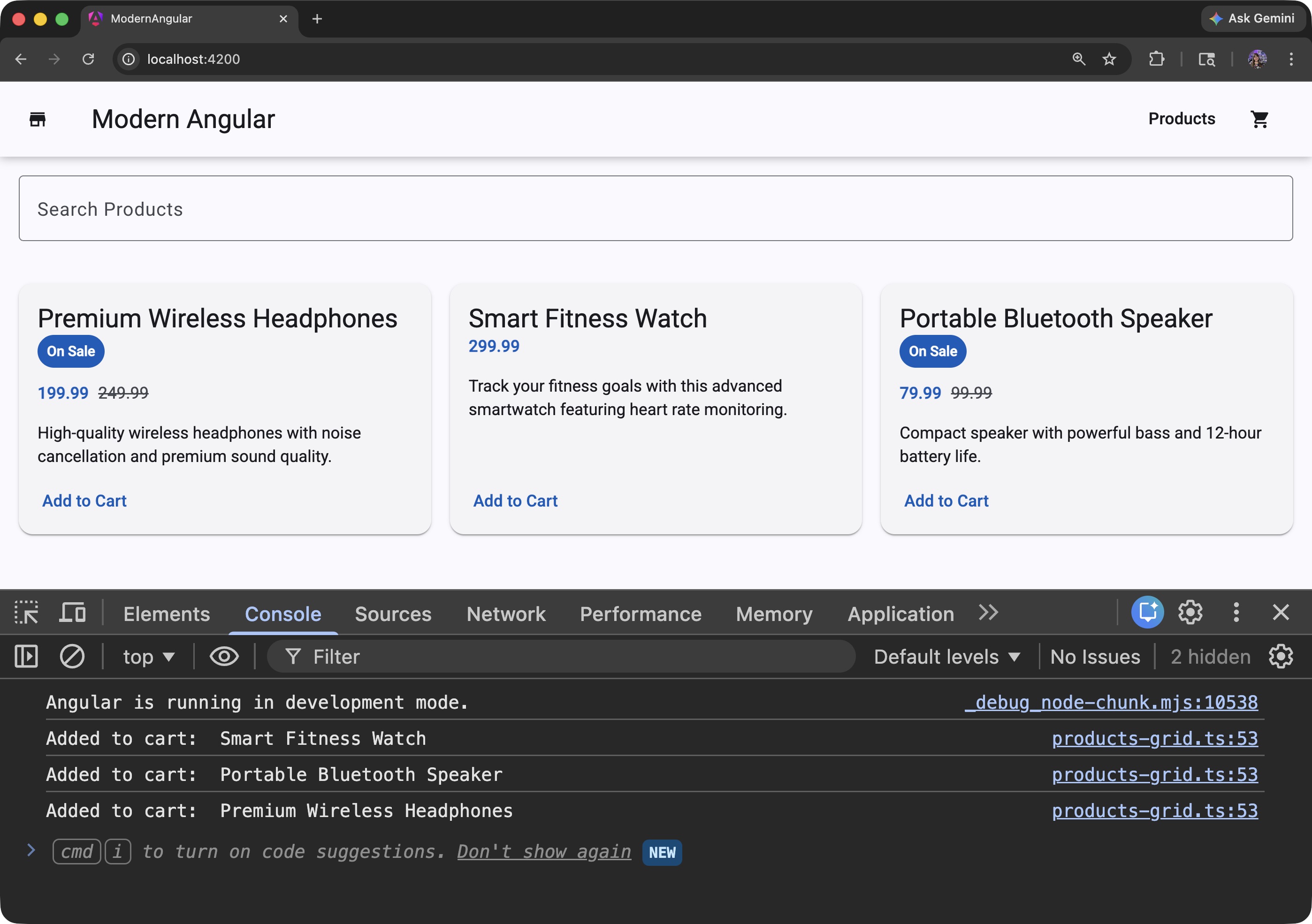
For now, logging is enough to validate the communication pipeline.
In the next lesson, we will replace the log with a real CartService.
Communication Summary
At this point in the course, we have both communication directions:
| Direction | API | Example |
|---|---|---|
| Parent to Child | input() |
Passing product data to ProductCard |
| Child to Parent | output() |
Emitting “Add to Cart” from ProductCard |
This pattern scales well and keeps components focused on a single responsibility.
Source Code
The full source code for the course is available on GitHub: loiane/modern-angular.
Next Step
In the next lesson, we will create a cart service so this event actually adds products to shared application state.
Watch the Video
This post is part of the Modern Angular Course series. Check the course page for the full episode list.